

Reviews
Traveling is exciting, but mobile data usually isn’t. After landing, you’re often stuck finding a SIM, comparing plans, and setting things up instead of enjoying the trip. Roaming feels easier, but the unpredictable costs make it risky. This time, I skipped both and used BNESIM instead.


BNESIM is an eSIM service that provides mobile data in multiple countries without a physical SIM card. I tested it on a trip to Spain to see if it could handle real travel use. I was especially interested in its flexible plans, which let you top up data and stay connected without switching SIMs.
For this test, I used BNESIM as my main connection during a five day trip across four cities in Spain. The trip was planned around attending a basketball game, which meant frequent movement and constant reliance on mobile data. This review is based entirely on real-world use, not specs or marketing claims.
I tested it in everyday situations while on the move. I used it for navigation in unfamiliar areas, messaging throughout the day, and occasional video streaming. This gave me a clear picture of how it performs in real travel conditions.
BNESIM delivered a smooth and reliable experience throughout my trip. It was fast, easy to use, and consistent across multiple cities, making it a strong option for travelers who want stable connectivity without dealing with physical SIM cards.
⭐Rating: 5/5
BNESIM offers a range of prepaid data plans that vary by data amount and validity period. Users can choose smaller short-term bundles or larger plans depending on how long they are traveling and how much data they expect to use.
For this trip, I chose a 10GB plan valid for 30 days, which cost $15.59. The decision was made before traveling to Spain to make sure I had enough data for the full five day trip across four cities without worrying about running out. By the end of the trip, I didn’t end up using all of the data from the plan.
| Data option | Validity | Pricing |
| 1GB | 30 days | $1.72 |
| 3GB | 30 days | $5.02 |
| 5GB | 30 days | $8.14 |
| 10GB | 30 days | $15.59 |
| 20GB | 30 days | $30.16 |
| 50GB | 30 days | $69.84 |
| 10oGB | 30 days | $120.66 |
| Unlimited | 10 days | $33.48 |
Note: Unlimited plans do not support hotspot use.
The Verdict: BNESIM is best for travelers who want stable, flexible mobile data without dealing with physical SIM cards. It works well for short to medium-length trips and moderate to heavy everyday use like navigation, messaging, and browsing. It is a strong option for users who value control over their data usage and provide reliable hotspot support during travel.
⭐Rating: 5/5
Here’s what I did to get the BNESIM eSIM up and running.
I went to the BNESIM website on my phone and chose a 10GB plan valid for 30 days for $15.59. I purchased it one day before traveling to Spain. Right after the purchase, I received an email with the QR code, installation instructions, and a link to download the BNESIM app. I planned to activate it once I landed.
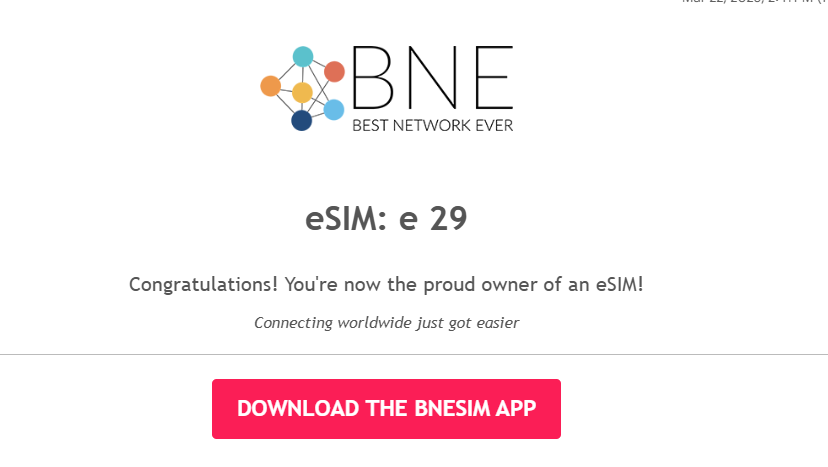
The installation took a few minutes. I use an iPhone 13, so I downloaded the BNESIM app using the link from the email and installed the eSIM directly through the app instead of scanning the QR code.I labeled the eSIM on my phone: ‘BNEsim’ so I could easily identify it later.
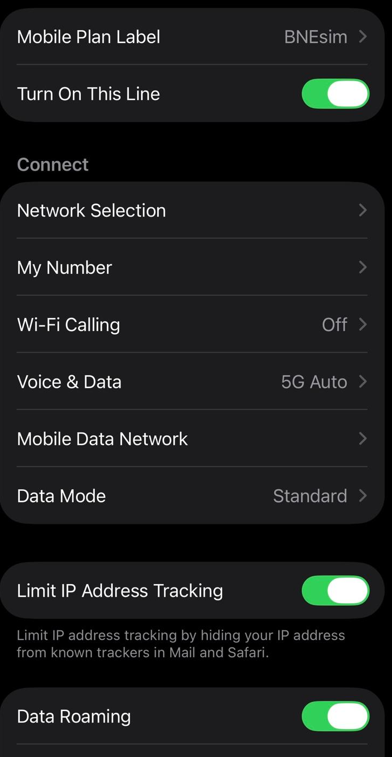
I made sure my physical SIM stayed as the main line for calls and messages, while the BNESIM eSIM handled all mobile data.
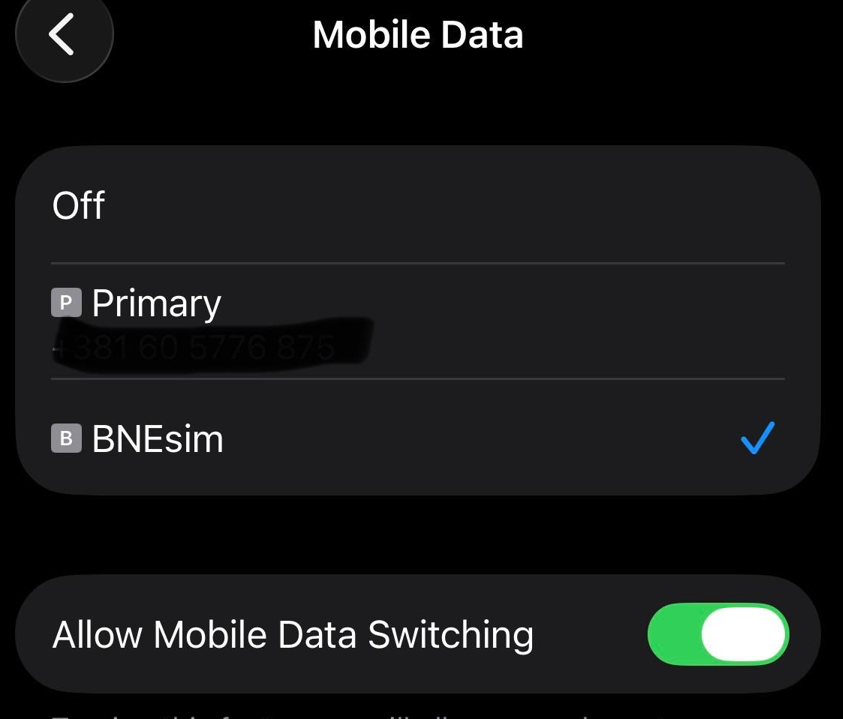
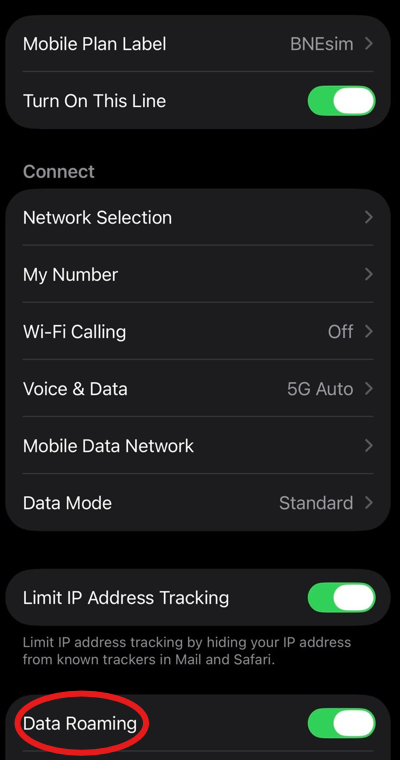
The final step was turning on data roaming after I came out of the airplane in Spain. The eSIM connected immediately and I was online within seconds.
I mainly used the BNESIM app to keep track of my data usage during the trip.
The setup was smooth from start to finish, with quick app-based installation and instant connection right after landing, with no issues.
⭐Rating: 5/5
Since the activation went smoothly, I wanted to see how the BNESIM eSIM would perform while I was moving across Spain. The trip covered four cities: Barcelona, Vitoria-Gasteiz, San Sebastian, and Bilbao. I was constantly on the move, using the eSIM for daily navigation, communication, and quick entertainment between activities.

While traveling between cities and walking through urban areas, I relied on Google Maps for directions and route planning. TikTok was mainly used for finding places to visit and try good food, and the videos loaded quickly without interruptions. WhatsApp was also used frequently, and both messages, videos of basketball games, and photos of cathedrals were sent without delays.
Overall, the connection stayed stable throughout the trip. The only small delays happened occasionally when Uber updated routes inside Google Maps, but everything else worked smoothly enough for normal travel use without interruptions.
To check the BNESIM eSIM in action, I turned off WiFi and made sure it was the active data line on my iPhone 13. I ran Speedtest by Ookla in Barcelona’s city center and recorded download, upload, ping, and the network type.
Download speeds came in around 2.96 Mbps, with uploads at 0.53 Mbps, and ping remained stable during the test. The connection didn’t drop or switch networks while the test was running.
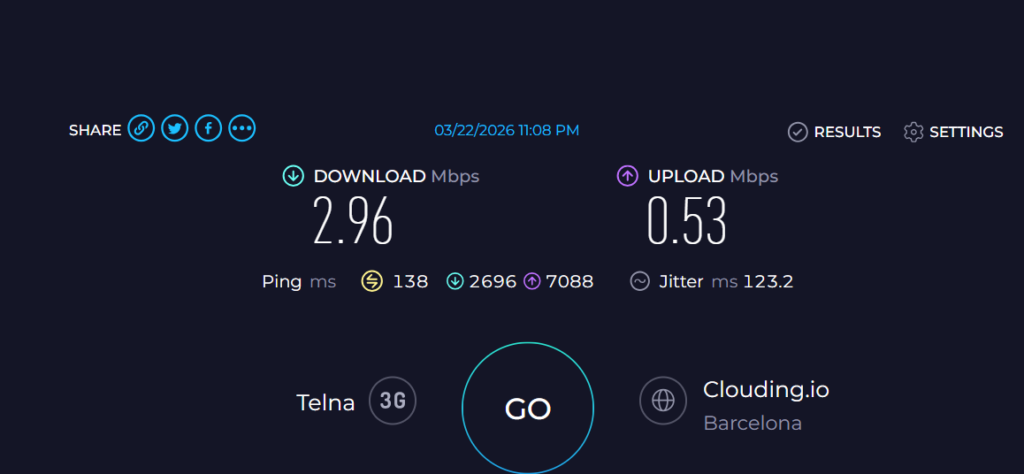
In practical terms, this meant that Google Maps and WhatsApp worked smoothly. Messages, photos, and videos sent without issues, and TikTok loaded quickly. Only slightly heavier tasks felt a bit less responsive, but overall the connection was stable enough for normal travel use.
The speed test results alone would suggest weak performance, especially for more than basic use. However, real-world experience in Spain felt better than expected, possibly due to changing network conditions while moving from city to city. Despite low measured speeds, the connection stayed usable throughout the day without major issues.
I used Google Maps throughout the trip, mostly while walking and sightseeing, and occasionally in an Uber or taxi. Navigation worked smoothly in all four cities without any issues.
In Barcelona, while heading to see Sagrada Familia, I deliberately changed the route while walking. The app recalculated almost immediately and updated the directions without any lag. In San Sebastian, I used it to find a well-known Basque cheesecake, and it guided me through crowded streets without losing accuracy or freezing.
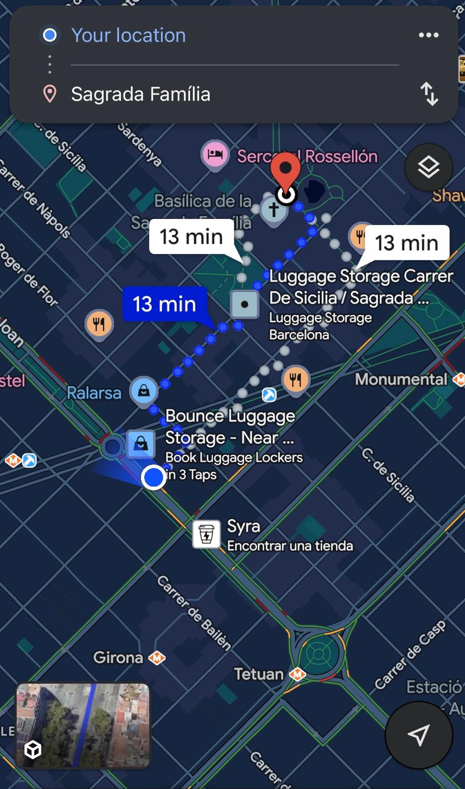
The only slight delay happened when an Uber driver missed a turn. The route updated within 2 to 3 seconds, which was noticeable but not disruptive.

For travelers, this matters because reliable navigation saves time and avoids confusion, especially in busy or unfamiliar areas. Even with small delays, the eSIM handled real-time directions well enough to move around without stress.
I used WhatsApp throughout the trip to test everyday communication. This included sending text messages, photos, and voice messages in different situations.
Text messages were delivered instantly without any delays. For photos, I deliberately sent multiple pictures of food to my family, and all of them went through quickly without retries or compression issues. I also sent several 40 to 50 second voice messages to our travel group, and they uploaded without delays.
Videos were also part of the test. I shared multiple clips from the Fernando Buesa Arena, and all of them sent successfully without failures or noticeable waiting times.

For travelers, this matters because messaging is key for staying in touch, sharing plans, and coordinating in real time, especially when traveling in a group.
We’ve all had those in-between moments while traveling, sitting on a bus and trying to figure out what to see next. I used that time between Vitoria, Bilbao, and San Sebastian to watch YouTube videos and plan my trip.
Videos started quickly and played smoothly. Even though this was meant to be a 720p test, most videos loaded in full HD without buffering. Playback stayed stable the whole time, with no drops in quality or interruptions.
I also tried a longer guide video about what to see in the Guggenheim Museum in Bilbao. It loaded perfectly, and even the ads played without any delays or buffering.
For travel use, this means the eSIM handles casual streaming very well, whether you are watching short clips or longer guides while moving between destinations.
In everyday use, the BNESIM eSIM delivered a very consistent experience across the trip. Navigation with Google Maps stayed reliable in all four cities, with fast rerouting and no freezes, even in crowded areas. Messaging on WhatsApp worked without issues, with instant texts and smooth sending of photos, videos, and voice messages.
Streaming was just as stable. YouTube videos loaded quickly and played without buffering, even during longer playback sessions while traveling between cities.
The speed test numbers suggested weaker performance, but real-world use told a different story. The connection stayed stable and responsive throughout the trip. In this case, consistency mattered far more than peak speeds.
For travel, the goal is not chasing high Mbps numbers but having a connection that works when you need it. BNESIM delivered that kind of stress-free experience.
Performance Verdict
BNESIM proved to be reliable in real-world use across multiple cities in Spain. Despite modest speed test results, it handled navigation, messaging, and streaming without issues, making it a dependable choice for everyday travel connectivity.
⭐Rating: 5/5
Hotspot becomes important when traveling with multiple devices or working on the go. For this test, I used the 10GB BNESIM plan since hotspot is not supported on unlimited plans.
Hotspot was enabled via iPhone 13 Personal Hotspot, and a Dell laptop was connected as the main device. The connection stayed active throughout, while the phone was also used for navigation and messaging.
It was used for work tasks like writing this article, replying to emails, and working in Google Docs. I then added more load by opening multiple tabs, including YouTube music, an Athletic Bilbao shop website, Facebook, and email. Everything remained responsive.
The connection stayed stable with no drops or noticeable slowdowns, even with other users connected and making video calls. Browsing and typing remained smooth, with fast page loads and stable multitasking.
Hotspot Verdict: BNESIM hotspot worked reliably for real-world light to moderate work tasks, with no drops, no throttling, and stable multi-device performance.
⭐Rating: 5/5
Even though I didn’t run into any real issues with the eSIM during the trip, I still wanted to test customer support from a traveler’s perspective, since this can be critical when something actually goes wrong abroad.
Support was accessed through the BNESIM in-app chat. The initial response came from an AI chatbot, which replied immediately after I opened the conversation. To simulate a real issue, I said that my hotspot was not working. The chatbot immediately asked a few follow-up questions to better understand the situation and possible causes.
There was a clear attempt to narrow down the problem step by step, and the bot stayed responsive throughout the conversation. I intentionally gave some inconsistent or unhelpful answers to test patience, but each reply remained calm, structured, and focused on troubleshooting rather than repeating generic FAQ responses.
No human agent joined the chat during the test, so there was no escalation to live support. However, the chatbot continued guiding the conversation without delay, and the responses stayed relevant to the issue I described.
While this was not a full resolution scenario, the interaction itself felt structured and supportive enough to potentially guide a user toward fixing common issues without needing escalation.
Customer Support Verdict: BNESIM support is fast and responsive at the chatbot level, but without clear escalation to a human agent during testing, its reliability in urgent real-world situations remains uncertain.
⭐Rating: 5/5
BNESIM eSIM is a digital SIM that you install by scanning a QR code after buying a plan. It activates on your device and provides mobile data without a physical SIM.
Yes, BNESIM supports hotspot on most plans and devices. You enable it through phone settings and share your data connection. In testing, hotspot worked on a 10GB plan without issues. Unlimited plans do not support hotspot.
Yes. BNESIM is safe when downloaded from official app stores. Security depends mainly on standard device safety practices, such as keeping your phone updated and avoiding unofficial sources, rather than the eSIM itself.
Yes. BNESIM is designed for international travel and works in many countries without roaming fees. It is suitable for navigation, messaging, and basic streaming.
Any device that supports eSIM, including recent iPhones, Samsung Galaxy, Google Pixel, and some tablets. Compatibility depends on the specific model.Compatibility depends on the device model and region, so it is important to check your specific phone before purchasing a plan.

Our mission is simple: to make sure you never have to ask, “What’s the WiFi password?” again. All our tips come straight from personal experience — because we’d never recommend something we haven’t put to the test ourselves.
Reviews