


For my two-day trip to the Philippines, I initially considered buying a Philippine SIM card. But since I wanted to avoid the hassle of finding a store and swapping physical SIMs, I decided to try an eSIM instead, specifically, Breeze eSIM.
In this guide, I share my real experience using Breeze eSIM, covering its plans, pricing, and overall reliability during a short trip. I tested key factors like connection stability, ease of setup, hotspot sharing, and customer support to see how well it performs in everyday travel situations.
Breeze eSIM is a dependable travel eSIM that delivers where it matters most, though not the most flexible or support-friendly option.
⭐Rating: 4.2/5
Breeze eSIM offers two main types of plans: unlimited data plans and fixed data plans, with durations ranging from 1 to 30 days. Here’s a quick snapshot of some of their options:
| Data | Duration | Price |
| Unlimited | 1 day | $8.50 |
| Unlimited | 7 days | $52.50 |
| Unlimited | 15 days | $99 |
| 1 GB | 7 days | $6.50 |
| 10 GB | 30 days | $46 |
| 50 GB | 30 days | $162 |
For the unlimited plans, it’s important to note that “unlimited data” comes with a daily cap on high-speed data. You get up to 1 GB of full-speed data (up to 5G where available) every 24 hours. After that, speeds are reduced to a maximum of 512 kbps until the next 24-hour cycle resets.
For this trip, I chose the 1GB plan valid for 7 days. Since I was only in the Philippines for two days and needed data mainly for light work and social use, it was the most practical option.
Verdict: Breeze’s plans are straightforward, but they do feel somewhat rigid. You’re limited to preset durations, unlike some eSIM providers that let you customize the number of days. Also, while the unlimited plans sound appealing, the 1GB daily high-speed cap may feel restrictive for heavier users.
Rating: 4/5
For my trip, I purchased the 1 GB plan valid for seven days. The checkout process was straightforward, with multiple payment options available, including major credit cards, Google Pay, and PayPal.
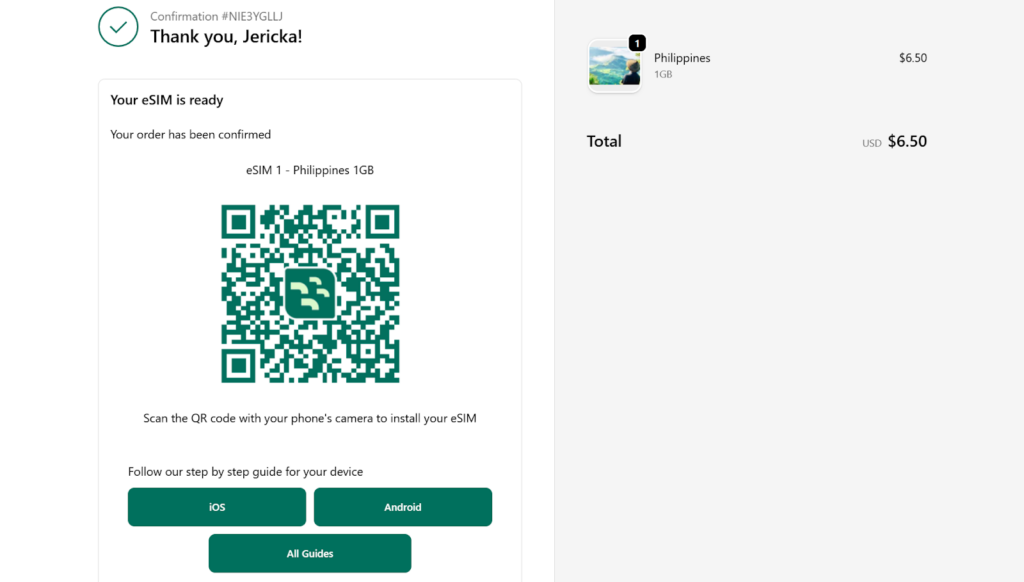
eSIM purchase confirmation page with installation instructions
Right after payment, the confirmation page displayed a QR code for eSIM installation, along with step-by-step guides tailored to your device (Android or iOS). It also included helpful reminders, such as enabling data roaming and disabling roaming on your primary SIM. I received the same instructions via email, which made it easy to refer back to them later.
Breeze offers three installation methods: Quick Install, QR code, and manual setup. I used the Quick Install option, which worked seamlessly. The process was simple and took just a few minutes.
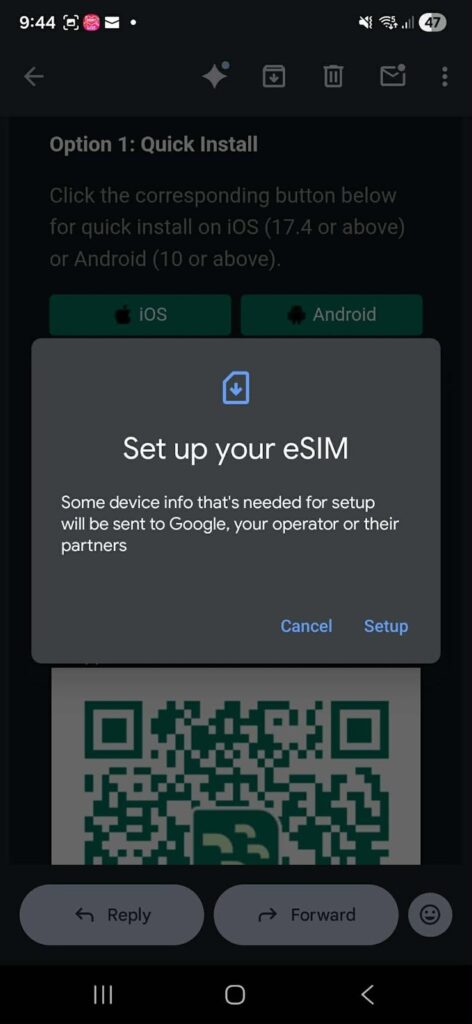
Breeze eSIM Quick Install feature
One thing I noticed is that the eSIM was labeled “eSIM Go” during installation. After looking it up, I found out that Breeze operates as an affiliate of eSIM Go, so the label made sense. I simply renamed it afterward to avoid confusion.
After installation, I received both a text message and an email confirming that the eSIM was ready for activation. I activated the eSIM upon arrival in the Philippines by turning on mobile data and enabling roaming. This process was instant, and I also received confirmation once it was successfully connected.
Breeze also requires you to create an account to manage your eSIM. This allows you to track data usage and top up if needed. Setting up the account was quick and gave me better visibility into my usage.
Activation verdict: The entire process was extremely user-friendly. Breeze provides instructions at every step, so there’s little room for confusion. Installation and activation were both smooth, with the eSIM connecting instantly once I arrived and enabled the correct settings.
Rating: 5/5
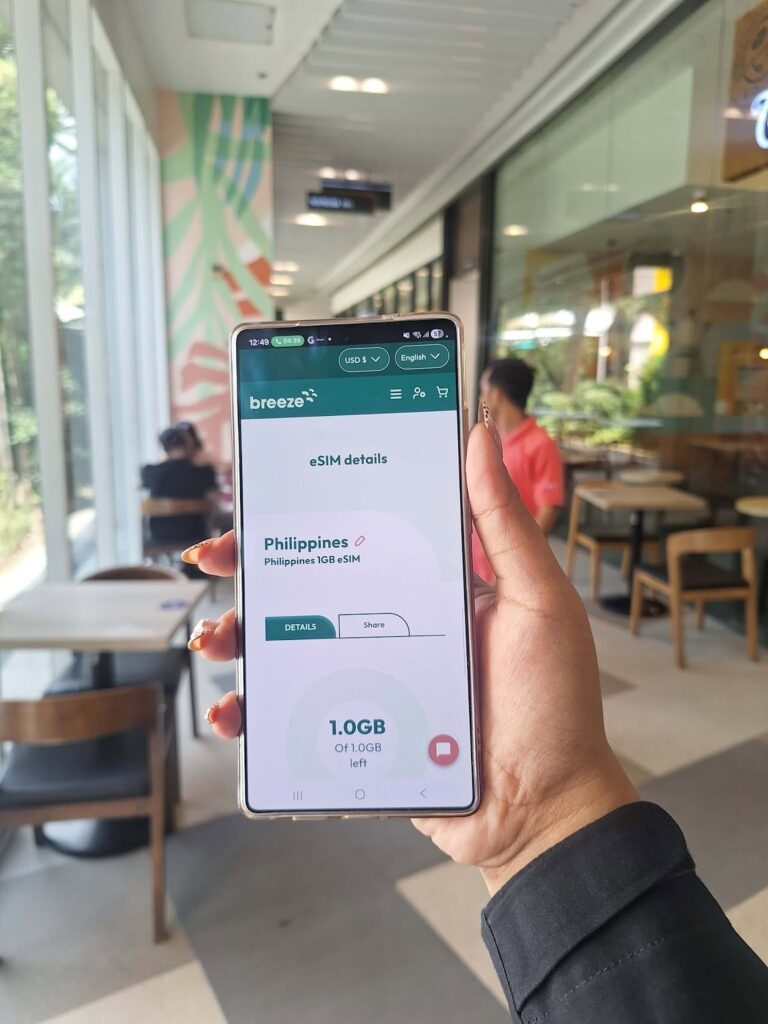
I used Breeze eSIM in Taguig, specifically in Bonifacio Global City, one of Manila’s main hubs for upscale shopping and dining. Throughout my stay, the connection was stable and consistent, with no noticeable interruptions. Here’s a closer look at how Breeze eSIM performed in real-world use:
To test Breeze eSIM’s speed, I turned off WiFi, set Breeze as my primary data line, and used Speedtest by Ookla for consistent results.
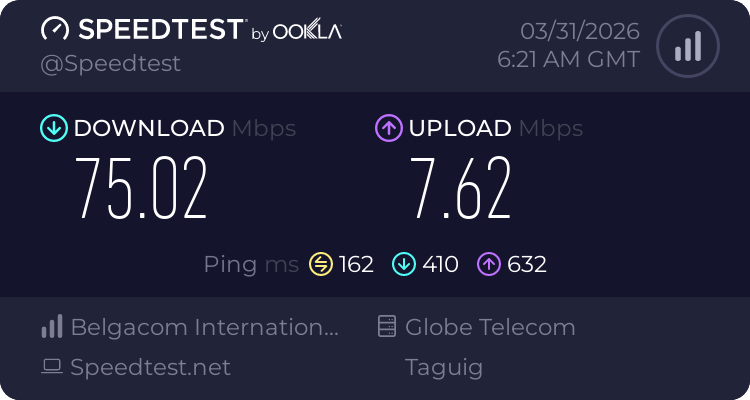
First speed test result with Breeze eSIM
On the first test, I recorded 75.02 Mbps download, 7.62 Mbps upload, and 162 ms ping. On the second test, speeds dropped to 21.55 Mbps download, 6.16 Mbps upload, with a higher ping of 352 ms.
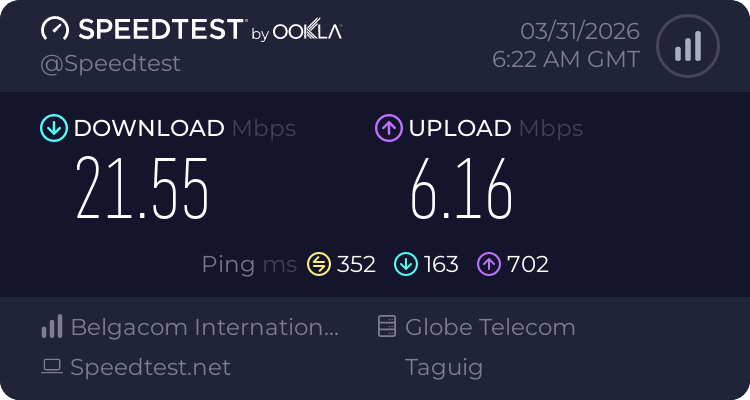
Second speed test result with Breeze eSIM
These results show that Breeze eSIM can deliver strong download speeds, especially during optimal network conditions. Speeds above 20 Mbps are more than enough for everyday travel needs like Google Maps, social media, video calls, and even HD streaming.
The variation between tests suggests that performance can fluctuate depending on network congestion or location. The higher ping, especially in the second test, may result in slight delays during video calls or online gaming, but it should not affect general browsing or messaging.
I used my mobile data for Google Maps during my Grab ride to make sure I was heading in the right direction. The map updated in real time and even suggested an alternative route when the driver took a different turn, which gave me added peace of mind.
Navigation was smooth throughout. You can expect Breeze eSIM to be reliable for directions, route changes, and real-time tracking while getting around.
To test messaging reliability, I used both Messenger and WhatsApp. I sent a text message, one HD photo, and a 30-second voice note on each app to compare speed and consistency.
| Type of message | Messenger send time | WhatsApp send time |
| Text | Immediately | Immediately |
| HD photo | ~3 seconds | ~2 seconds |
| 30-second voice note | ~5 seconds | Immediately |
Breeze eSIM handled basic messaging tasks without any issues. Text messages were delivered instantly on both apps, which is what most travelers will rely on for day-to-day communication.
Media sending was also fast and consistent. HD photos took only a few seconds to send, while voice notes were delivered almost instantly on WhatsApp and within a few seconds on Messenger.
I tested Breeze eSIM’s performance for casual video streaming using YouTube. For this test, I played two short videos (around 1–10 minutes each). Both started quickly, with minimal startup time, and automatically played at the highest available quality: 720p for the first video and 1080p for the second.
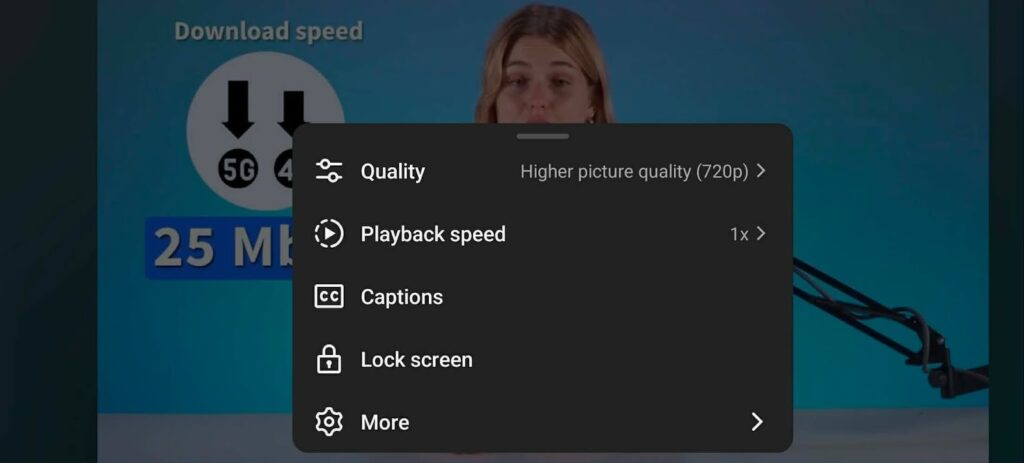
First video streamed smoothly at the highest available quality (720p)
There was no buffering during playback, and video quality remained stable throughout. Even when switching between videos, the connection remained consistent, with no noticeable drops in resolution.
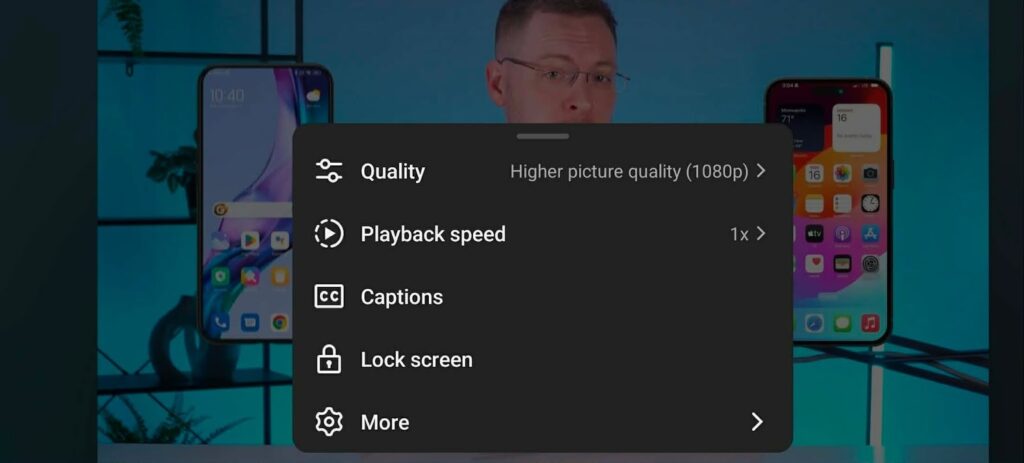
Second video streamed smoothly at full HD quality (1080p)
Overall, Breeze eSIM delivered a stable, reliable connection for everyday travel. While speeds varied at times, real-world performance remained consistent where it mattered most.
Performance verdict: Reliable and consistent for everyday travel needs, with stable performance across navigation, messaging, and light streaming despite occasional speed fluctuations.
Rating: 5/5
I tested Breeze eSIM’s hotspot sharing by using my eSIM as a hotspot for my laptop. There were no restrictions based on the plan, and setup was quick and straightforward.
I was able to work on my laptop without any issues, including writing a business letter, checking emails, using Google Docs, and browsing multiple web pages for research. The connection remained stable throughout, with no noticeable lag or interruptions.
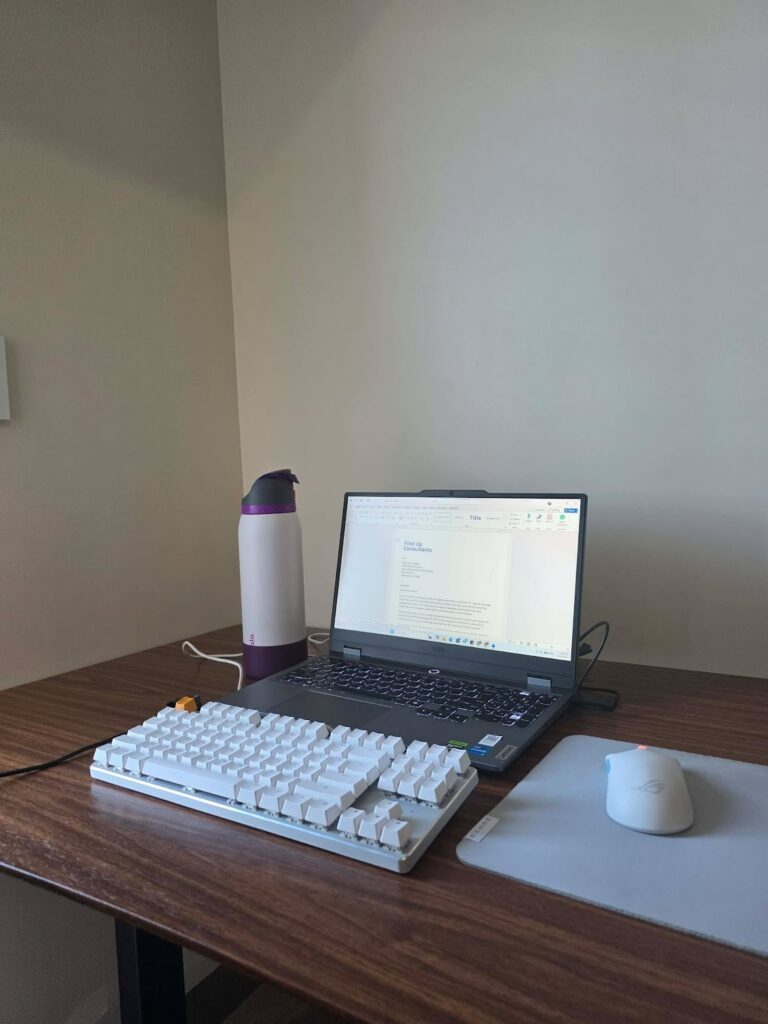
Writing a letter on my laptop using my phone as hotspot
Hotspot verdict: Breeze eSIM performs well for hotspot use, especially for light to moderate tasks like work, email, and browsing.
Rating: 5/5
My experience with Breeze eSIM’s customer support was less smooth compared to the setup and performance.
I initially reached out to find out how to top up my plan, but the process felt unnecessarily complicated. The chatbot first asked for my email and ZIP code. Since I couldn’t remember exactly which ZIP code I used during purchase, I had to retry the process.
After locating my account, I was told there was an issue and was then asked to provide my email again, along with the eSIM’s ICCID, which was too much of a hassle to check.
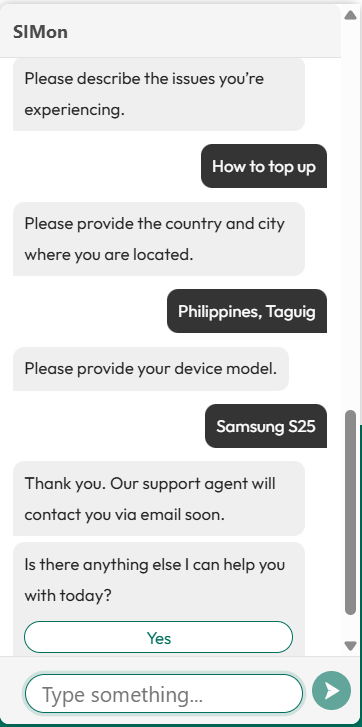
Chatbot asked too many questions without giving any answers
Even after logging in to my account, I was still asked for the ICCID, followed by additional details such as my country and city. This felt redundant, especially since I was already logged in. Instead of resolving my concern directly, the system created a support ticket, and I did not receive a prompt response.
Breeze offers a help center and a chatbot called Simon, but in my experience, the chatbot asked multiple questions without providing clear or immediate answers.
Customer support verdict: Getting assistance from Breeze eSIM feels overly complex for simple concerns. Too many verification steps and a lack of immediate assistance make the experience frustrating, especially for travelers who may need quick help on the go.
Rating: 2/5
Yes, it is a reliable option for short trips and everyday use like navigation, messaging, and light work. It is easy to set up, though plan flexibility is limited compared to some providers.
After purchase, install the eSIM using Quick Install, QR code, or manual setup. Once you arrive at your destination, turn on mobile data and enable roaming to activate it.
Breeze offers both fixed data plans and unlimited data plans. Unlimited plans typically include around 1 GB of high-speed data per day, after which speeds are reduced.
No, Breeze eSIM is data-only. You can still make calls and send messages through apps like WhatsApp, Messenger, or FaceTime using mobile data.
Pricing depends on the data amount and duration. Smaller plans start at a few dollars, while larger or longer plans can go over $100.
You can install the eSIM in advance, but activation works best upon arrival. The plan starts once it connects to a local network.
Breeze is powered by eSIM Go, which provides the network service. This is why the eSIM may appear as “eSIM Go” during installation.

Our mission is simple: to make sure you never have to ask, “What’s the WiFi password?” again. All our tips come straight from personal experience — because we’d never recommend something we haven’t put to the test ourselves.
Reviews