

Reviews
I used Nomad eSIM as my main data connection during a three-day trip to Zagreb, Croatia. This review is based on real-world use and covers setup, pricing, and everyday performance for navigation, messaging, hotspot, and streaming.


Every time I travel, mobile connectivity is the first friction point. Buying a local SIM often means hunting for a store, dealing with language barriers, showing documents, and hoping the plan actually works the way it was advertised.
Roaming, on the other hand, is usually simple, but expensive and unpredictable. I opted to use an eSIM instead.
For this trip, I tested Nomad eSIM to see if it could remove that friction entirely.
Instead of swapping SIM cards or relying on hotel WiFi, I used Nomad as my primary mobile data connection during a three-day business trip to Zagreb, Croatia.
This review is based entirely on real use during my trip, not on specs or marketing claims. I tested Nomad the same way most travelers would, using maps, messaging apps, calls, hotspot, downloads, and casual streaming.
The verdict: Nomad eSIM delivered consistent, reliable mobile data throughout my trip and is best suited for short trips, business travel, and travelers who value convenience over hunting for the cheapest local SIM.
⭐ Rating: 5/5
Nomad offers prepaid, destination-based data plans, meaning pricing and data allowances vary depending on where you travel.
Plans are available as either fixed data bundles or unlimited plans with a set validity period.
For my trip to Croatia, I chose a 1 GB plan valid for 7 days, which cost $4.50 (3.88 EUR).
Since I was only there for three days, this plan gave me enough flexibility to use navigation, messaging, calls, and browsing naturally without constantly watching my data usage.

Note: Nomad is a data-only eSIM. It does not include a phone number, SMS, or traditional cellular calls, but it works with messaging and calling apps like WhatsApp and FaceTime.
Below is an overview of the Nomad eSIM data plans available for Croatia at the time of testing.
The table shows the different data options, how long each plan is valid, and the upfront price, so you can quickly see which plan fits your trip length and expected usage.
| Data option | Validity | Price |
| 1 GB | 7 days | $4.50 |
| 3 GB | 30 days | $9.00 |
| 5 GB | 30 days | $12.50 |
| 10 GB | 30 days | $16.00 |
| 20 GB | 30 days | $20.00 |
| 50 GB | 30 days | $45.00 |
| Unlimited | 3 days | $11.00 |
| Unlimited | 5 days | $17.00 |
| Unlimited | 7 days | $23.00 |
| Unlimited | 10 days | $31.00 |
If I were traveling longer or streaming more heavily, I would likely choose one of the unlimited plans. For a short business trip, the smallest fixed plan was more than enough.
Plans & pricing verdict: Nomad is well-suited for short to medium trips, offering fair pricing and flexible plans that make it easy to choose the right amount of data and scale up if needed.
⭐ Rating: 5/5
I used Nomad on an iPhone 15 and completed the setup before leaving for Croatia, so I could connect as soon as I landed.
Here is the exact setup process from start to finish.
I searched for Nomad eSIM in the App Store and downloaded the app directly to my iPhone 15.
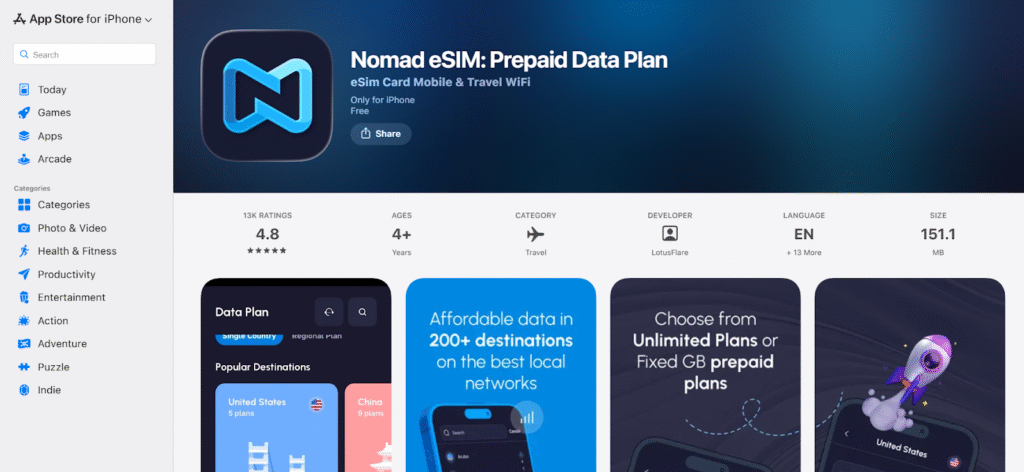
I created an account by signing in with my Gmail (Google account), which took only a few seconds.
Inside the app, I searched for Croatia and selected the 1 GB plan valid for 7 days.
Since my trip was three days, this plan was enough for navigation, messaging, calls, and browsing without constantly checking usage.
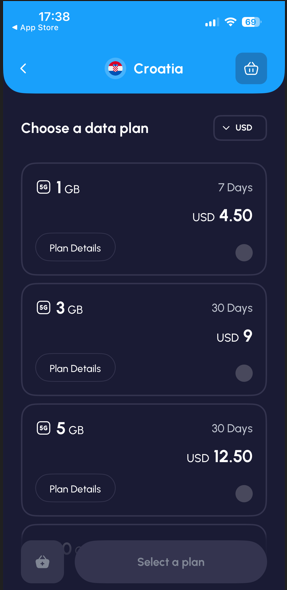
I purchased the plan directly in the app. Right after payment, the plan appeared in my Nomad account.
I also received a confirmation email with a QR code. I did not scan it because the app handled the full activation and installation process.
Nomad guided me through the installation step by step inside the app.
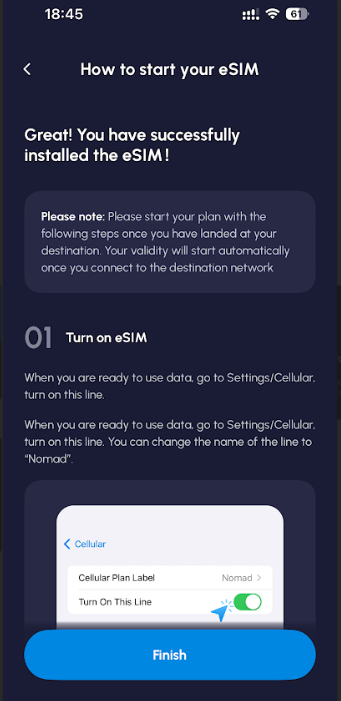
During setup, I labeled the eSIM as “Nomad,” so it would be easy to recognize later in my cellular settings.
In my iPhone cellular settings, I set:
This way, I kept my normal number active while Nomad handled all data.
Once I arrived in Croatia, I opened my phone settings and enabled data roaming for the Nomad eSIM. The connection activated almost instantly.
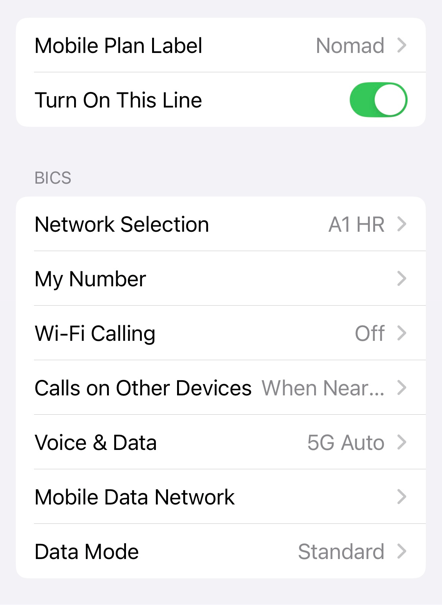
From purchase to being online, the entire process took only a few minutes, and I did not run into any errors or confusing prompts.
Activation verdict: Nomad setup was fast, intuitive, and fully app-driven with no troubleshooting required.
⭐ Rating: 5/5
Nomad automatically switched between A1 and Telemach depending on signal strength. I stayed on 5G the entire time and did not need to change any network settings manually.
Before running the speed test at the hotel, I turned WiFi off and made sure the Nomad eSIM was set as the active data line on my iPhone. This ensured the test reflected mobile performance only, without any influence from nearby networks.
I used Speedtest by Ookla and ran the test from my hotel room in central Zagreb while connected to 5G. The test recorded download speed, upload speed, ping, and network type.
The results showed a download speed of 69.08 Mbps and an upload speed of 41.06 Mbps, with low ping and a stable 5G connection.
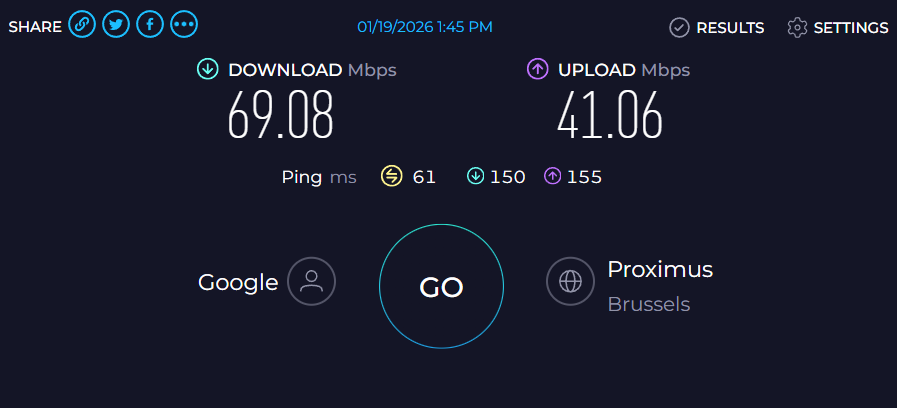
In everyday use, these speeds translated into fast file downloads, quick uploads of image-heavy emails, smooth app performance, and no delays when sending files or joining calls.
Navigation is often the first thing that exposes a weak connection, especially in a city where you are constantly switching between streets, buildings, and underground passages.
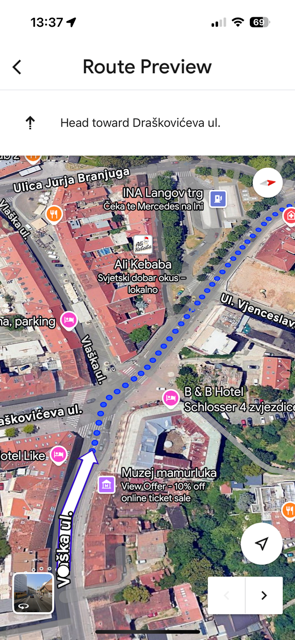
In Zagreb, I used Google Maps constantly. I intentionally took wrong turns, changed direction mid-route, and forced reroutes just to see how quickly the app would respond.
Each time, it recalculated within a few seconds. The map tiles loaded smoothly, the blue dot stayed accurate, and I never had that moment of staring at a frozen screen while trying to figure out where to go next.
On Sljeme, I used Komoot for hiking navigation. This is where weaker connections usually struggle, especially when loading trail details, elevation data, or rerouting after taking a wrong turn.
In this case, everything loaded smoothly. I could zoom in and out of the map, check trail information, and track my position without delays.
See also: How much data does Google Maps use in 2026?
I used WhatsApp as my main communication tool during the trip.
Text messages were sent instantly. Photos uploaded quickly. Voice notes went through without any noticeable delay.
I also made regular voice calls and several video calls, and all of them were stable. There were no dropped calls, no strange audio issues, and no lag that made conversations awkward.
Even while walking through busier areas of the city, calls stayed clear. Video calls did not freeze or drop unexpectedly.
I did not use Nomad for long binge-watching sessions, but I did use it for casual video streaming, which is how most travelers actually consume content on the go.
I mainly tested this with YouTube, watching short videos at 720p and 1080p. Videos started playing immediately, and the quality stayed stable throughout.
I did not experience sudden drops in resolution, long loading times, or buffering interruptions.
That kind of performance is exactly what you want from a travel connection. It does not need to replace home broadband; it just needs to work when you open a video and hit play.
For what it is worth, TikTok clips also loaded instantly and played smoothly while I was waiting between appointments.
Overall, Nomad delivered a consistently solid experience across all the tasks that matter most while traveling:
What stood out most was consistency rather than peak speed.
Instead of chasing high Mbps numbers, Nomad delivered steady, stress-free connectivity that made moving around, communicating, and working from my phone feel effortless while traveling.
Performance verdict: Nomad proved reliable across city movement, hiking, work tasks, and casual use, making it a dependable travel eSIM.
⭐ Rating: 5/5
Nomad supports hotspot usage on the tested plan.
I tested Nomad’s hotspot feature by connecting my Windows laptop to my phone and using it as I normally would while traveling.
I worked in Google Docs, downloaded several PDF files, used WhatsApp Web, and watched a short YouTube video to check how the connection handled everyday tasks.
The hotspot connection stayed stable throughout the test. Pages loaded quickly, documents synced without delays, file downloads completed smoothly, and video playback worked without buffering.
I did not notice any lag, dropouts, or sudden slowdowns, and the experience felt no different from using a regular WiFi connection for light work.
Hotspot verdict: Nomad’s hotspot worked reliably for real work tasks and casual use, with no noticeable performance issues.
⭐ Rating: 5/5
During this trip, I did not run into any issues that required contacting customer support, which in itself reflects how stable the service felt in everyday use.
Nomad provides support through its in-app help section as well as through resources on its website, both of which are easy to access.
Since I did not need troubleshooting or escalation, I couldn’t fully assess response times or how support performs in a more urgent situation, but the lack of need to reach out was a positive sign during this trip.
Customer support verdict: Support is available and easy to access, but I did not need to rely on it during real use.
⭐ Rating: 5/5
Yes. Nomad is built specifically for people who travel and want a simple way to stay connected without buying a local SIM.
It works especially well for short trips, business visits, and frequent travelers who move between countries and want something that just works when they land.
Yes, as long as local networks offer 5G, Nomad can connect to it. During this trip, the connection stayed on 5G both in the city and in more remote areas, which made a noticeable difference in everyday use.
Yes. Nomad supports hotspot usage, so you can connect your laptop or another device when needed.
This is useful for light work, browsing, sending files, or quickly getting something done when WiFi is not available.
Yes. Nomad handled navigation, messaging, voice and video calls, file uploads, and hotspot usage without issues, which makes it a solid option for short business trips and work-focused travel.
That depends on what you value more. A local SIM can sometimes be cheaper for long stays, but it usually means visiting a store, dealing with paperwork, and swapping SIM cards.
Nomad focuses on convenience, quick setup, and being online within minutes.
Nomad is a data-only eSIM, which means it does not come with a traditional phone number for regular cellular calls or SMS.
However, you can still make voice and video calls using apps like WhatsApp, FaceTime, Telegram, Zoom, and similar services.

Our mission is simple: to make sure you never have to ask, “What’s the WiFi password?” again. All our tips come straight from personal experience — because we’d never recommend something we haven’t put to the test ourselves.
Reviews