Over 1.5 million travellers turned to MyRoami last year
Independently testing eSIMs since 2021
Featured in Business Insider, Tech Times & Luxury Travel Magazine
SIM Cards
Does iPhone 16 have a SIM card?
The iPhone 16 supports both physical SIM and eSIM, but not in every region. Some models include a SIM card slot, while others are eSIM only, depending on where the device is purchased.
We test eSIMs in real travel conditions - across cities, countries, and everyday situations where
connection actually matters. That includes navigation, messaging, browsing, and remote work on the
move.
We buy eSIMs ourselves.
We test them during real trips.
We compare providers under the same conditions.
We don’t simulate usage or rely on provider data. We document both performance and failure.
Updated: May 28, 2026
Share
With how quickly updates roll out across devices from Apple, I’ve found it harder to keep track of what has actually changed. Features that once felt standard are now quietly evolving, and SIM cards are one of those areas where things are no longer consistent across every device.
From my experience, this can make a real difference in how you use your phone, especially if you travel often, switch carriers, or plan to reuse your existing SIM. The iPhone 16 does not follow a single global setup, which is why it can be confusing when upgrading.
In this guide, we will break down exactly how SIM cards work on the iPhone 16, including regional differences, dual SIM support, and what setup actually makes sense depending on how you use your phone.
Does the iPhone 16 Have a SIM Card Slot?
The short answer is yes, but not for every version of the device.
Some iPhone 16 models still include a physical SIM card slot, while others are eSIM only. The deciding factor is where the phone was purchased, not the model name itself.
This is where expectations and reality start to mismatch. Most people assume that a device should work the same regardless of where it is bought, but Apple has moved away from that approach.
For example, someone buying their iPhone in Europe may still find a SIM tray on the side. Meanwhile, a user buying in the United States will not see any slot at all.
A common situation is upgrading from an older iPhone and expecting to reuse your existing SIM card. Many users only realize something is different when they try to insert the SIM and cannot find where it goes.
Others notice it during setup, when the phone immediately prompts them to activate an eSIM instead. This change is subtle, but it shifts how you interact with your device. Instead of thinking about SIM cards as something you physically handle, Apple is moving toward a model where everything happens digitally.
In simple terms, the presence of a SIM tray is not universal across all iPhone 16 models.
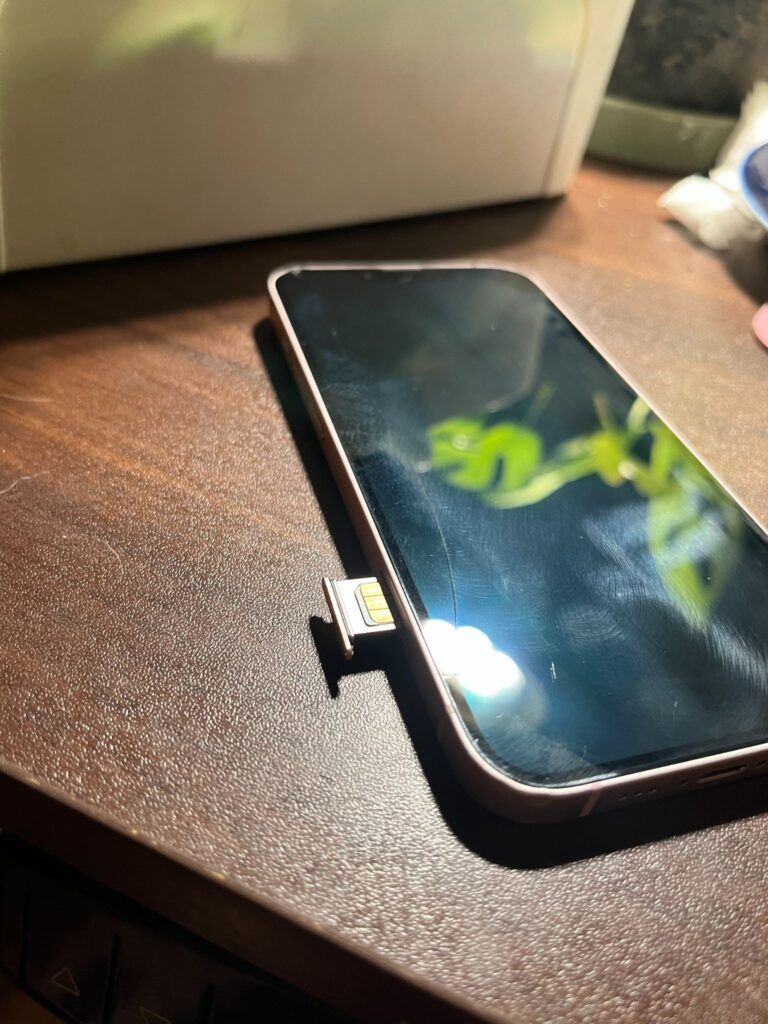
A quick look at a physical SIM tray in action. Some iPhone models still have this, but it really depends on where you bought your device.
iPhone 16 SIM Card vs eSIM by Region
SIM support on the iPhone 16 depends heavily on regional differences, which is one of the biggest reasons users get confused.
Here is how it typically works:
United States uses eSIM only, with no physical SIM tray
Europe and most global markets support both physical SIM and eSIM
Some Asian markets use hybrid configurations depending on carrier rules
At first glance, this might not seem like a big deal. But it becomes much more noticeable in everyday use.
Imagine two people traveling together. One bought their iPhone in the United States, and the other bought theirs in Europe. When they arrive in a new country, the second person can simply walk into a store, buy a prepaid SIM, and insert it. The first person, however, needs to find a carrier that supports eSIM and go through a digital activation process.
This is not always difficult, but it is not always instant either. In some places, especially smaller cities or less tourist-focused areas, eSIM support may be limited or require additional steps.
There are also situations where people try to lend or swap SIM cards temporarily. With eSIM-only devices, that flexibility is gone. Everything has to be transferred digitally, which may require account access or carrier support.
In practice, this means two people using the same iPhone 16 can have completely different experiences just because of where they bought their devices.
Why Apple Uses eSIM on iPhone 16
Apple’s move toward eSIM is not just about removing a physical component. It reflects a broader shift toward simplifying devices and making them more adaptable.
One of the main reasons is security. A physical SIM card can be removed, which can disconnect your number from the device. With eSIM, your mobile connection is embedded in the phone, making it harder to tamper with if the device is lost or stolen.
Another reason is convenience. Activating a new line no longer requires a physical card. You can scan a QR code or download a plan directly from your carrier. This removes the need to visit a store or wait for delivery.
An eSIM also allows for more flexibility in how people use their phones. Instead of being limited to one SIM or needing multiple slots, users can manage multiple plans digitally.
In everyday use, this is especially helpful for:
Switching carriers without needing a new SIM card
Setting up a data plan before traveling
Managing separate work and personal numbers
There is also a design advantage. Removing the SIM tray frees up internal space, which Apple can use for other components or improvements.
For many users, the biggest change is not the technology itself, but how it changes habits. You no longer need to carry SIM cards, keep ejector tools, or worry about losing something small but essential.
Can You Use Both eSIM and Physical SIM on iPhone 16?
Yes, but it depends on which version of the device you have.
In regions where a physical SIM tray is still included, you can use one physical SIM and one eSIM at the same time. In eSIM-only regions, the phone supports dual eSIM instead.
This setup is more useful than it might initially seem.
For example, many people use dual SIM to separate work and personal life. Instead of carrying two phones, you can keep both numbers active on one device.
Another common use case is travel. You can keep your main number active for calls and messages while using a local data plan to avoid roaming charges.
Some users even use dual SIM for better coverage. If one carrier has weak signal in certain areas, having a second line can provide backup connectivity.
The key difference with eSIM is that switching between these plans is done through settings, not by physically swapping cards.
How to Check If Your iPhone 16 Has a SIM Card Slot
If you are not sure which version you have, there are a few simple ways to check.
The easiest method is a physical check. Look at the side of your phone for a small tray with a pinhole. If you see it, your device supports a physical SIM card. If there is no tray, your iPhone is eSIM only.
You can also confirm through your settings. Go to Settings, then Cellular. If your phone only shows options to add or manage eSIM, then it does not support a physical SIM slot.
This is especially useful if you bought your device from another country or a reseller, since the SIM setup may not match what is typically sold in your region.
For a more accurate answer, you can check your model number and compare it with Apple’s official specifications for your region.
Benefits of eSIM on iPhone 16
eSIM has made managing my mobile connection a lot simpler, especially when I need flexibility.
Here are the main advantages I’ve noticed:
Instant activation without needing a physical SIM card
Easier switching between carriers directly from settings
Ability to store multiple plans on one device
More convenient setup for travel and roaming
No risk of losing or damaging a SIM card
What stands out to me over time is how much friction it removes. Setting up a new plan only takes a few minutes, and I don’t have to deal with finding a store or waiting for a SIM card anymore.
When I travel, this makes a big difference. I can sort out my data plan before I even leave, instead of figuring it out at the airport or once I arrive.
Does iPhone 16 have a SIM card FAQs
How to switch SIM card on iPhone 16?
If your iPhone 16 has a SIM slot, eject the tray, remove the old SIM, and insert the new one. US models are eSIM-only, so switch carriers in Settings → Cellular → Add eSIM.
Do you need a different SIM card for iPhone 16?
US models need an eSIM. Other regions can still use a nano-SIM if the phone has a SIM slot.
Can iPhone 16 have 2 SIM cards?
Yes. US models support dual eSIM, while others support nano-SIM + eSIM or dual eSIM.
How do I activate eSIM on iPhone 16?
Go to Settings → Cellular → Add eSIM, then scan your carrier’s QR code or use Quick Transfer.
Do I need to put my old SIM into the new iPhone 16?
Only if your model has a SIM slot. US iPhones use eSIM only, so transfer your number digitally.
Vukasin PetrovicContent SEO specialist
Vukasin has a master’s degree in Creative Writing, which he received at St. Francis College in Brooklyn. When he's not reading or playing video games, he's traveling and making the most of the remote work lifestyle. As an editor and writer in the travel and connectivity industries, he focuses on making eSIMs and mobile internet feel straightforward, translating technical details into clear, practical guidance for travelers and remote workers.
Our mission is simple: to make sure you never have to ask, “What’s the WiFi password?” again. All our tips come straight from personal experience — because we’d never recommend something we haven’t put to the test ourselves.