


Roaming
Roaming charges can quickly increase your phone bill when you travel, even with minimal usage. This guide explains how to avoid roaming charges with simple, practical options like eSIMs, WiFi, and local SIM cards, so you can stay connected without overspending.

The first time I traveled abroad, I came back to a phone bill that made no sense. I barely used my phone, but background apps, maps, and a few quick checks quietly added up.
That’s when it hit me how expensive roaming can be and how easily it can be avoided with a bit of planning.
If you’re wondering how to avoid roaming charges when travelling, the good news is that it’s actually pretty simple.
With a few small changes before and during your trip, you can stay connected without worrying about unexpected costs.
Roaming happens when your phone connects to a network outside your home carrier’s coverage area. Instead of using your usual network, your provider partners with a local carrier in the country you’re visiting.
Data roaming is just one part of that. It specifically refers to using mobile data like browsing, apps, or streaming while abroad. You can still roam for calls and texts even if data roaming is turned off.
Roaming charges are the extra fees your carrier adds when you use your phone abroad. These costs usually fall into three categories:
Most carriers either charge per usage or offer daily roaming packages.
For example, you might pay $10 per day to use your regular plan abroad, or you could be charged per MB if you don’t have a plan.
Roaming isn’t just expensive for no reason. Your home carrier has to pay foreign networks to use their infrastructure. Then they add their own markup on top.
There are also hidden costs behind the scenes. Data has to be routed internationally, agreements between carriers vary by country, and pricing isn’t standardized globally.
From what I’ve seen, the biggest issue is that pricing isn’t always transparent. You can easily use a small amount of data without realizing how quickly it adds up.
There’s no single solution that works for everyone, but there are a few reliable ways to avoid international roaming charges. I usually combine a couple of these depending on the trip.
This is the first thing I do before I even board the plane.
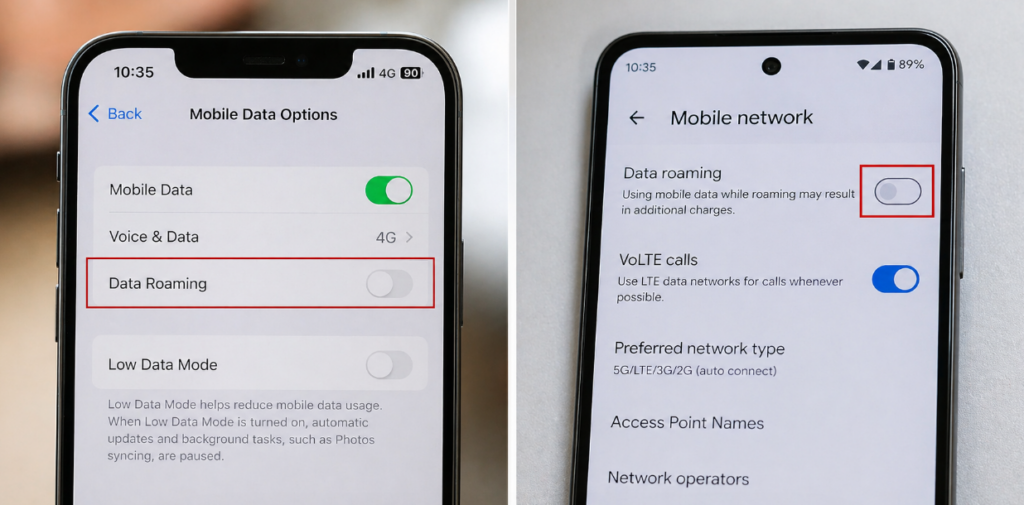
On both iPhone and Android, you can disable data roaming in your settings. This prevents your phone from using mobile data abroad.
You can also switch on airplane mode to completely stop all connections, then manually enable WiFi if needed.
WiFi is the easiest way to stay connected without paying extra.
Hotels, cafes, airports, and even public spaces often offer free WiFi. I rely on it for messaging, emails, and basic browsing.
That said, it’s not perfect:
It works, but I wouldn’t rely on it alone, especially if you need maps or ride apps on the go.
Getting a local SIM card is a classic solution.
Pros:
Cons:
This is what I personally use now, and it’s by far the easiest option.
An eSIM is a digital SIM you can install on your phone without removing your physical SIM.
Why I prefer eSIMs:
Most providers send you a QR code to activate your plan. If you want to see how the activation process works, check out our simple guide on how to activate an eSIM.
Sometimes, sticking with your carrier is the simplest option.
Daily roaming plans can work well if:
The downside is that costs add up quickly if you stay longer than a few days.
This is something I started doing after getting burned by roaming charges.
Before your trip, download:
It reduces your need for mobile data significantly.
One of the biggest hidden issues is background data.
Apps can use data even when you’re not actively using them. Think updates, syncing, and notifications.
To avoid this:
This alone can save a surprising amount of data.
If I had to pick one method, I’d go with an eSIM almost every time.
For short trips, a roaming plan might be fine. It’s convenient and requires no setup.
But for anything longer or if you want full control over costs, an eSIM is usually the better choice. It’s flexible, prepaid, and easy to manage without changing your number.
In most cases, combining an eSIM with WiFi gives you the best balance between cost and convenience.
Yes. You can avoid them entirely by turning off data roaming and using WiFi or an eSIM instead of your carrier’s network.
Go to Settings, disable data roaming, and consider using WiFi or installing an eSIM for travel.
Yes. Turning off data roaming only stops mobile data, not calls or texts.
In most cases, a travel eSIM or a local SIM card is cheaper than standard roaming.
In many cases, receiving texts is free, but this depends on your carrier.
Yes, as long as you don’t manually turn mobile data back on. You can still use WiFi in airplane mode.

The best global eSIM provider
From $2.3/week
A reliable eSIM provider for budget travelers
From $2.4/week
The best global eSIM provider
From $2.3/week
A reliable eSIM provider for budget travelers
From $2.4/week
Our mission is simple: to make sure you never have to ask, “What’s the WiFi password?” again. All our tips come straight from personal experience — because we’d never recommend something we haven’t put to the test ourselves.
Reviews